On July 22, 2025, the Cybersecurity and Infrastructure Security Agency (CISA), the Federal Bureau of Investigation (FBI), the Department of Health and Human Services (HHS), and the Multi-State Information Sharing and Analysis Center (MS-ISAC) released a joint Cybersecurity Advisory (CSA) to disseminate Tactics, Techniques and Procedures (TTPs) and Indicators of Compromise (IOCs), associated with Interlock ransomware, identified through FBI investigations as recently as June 2025.
This joint CSA is a continuation of CISA’s ongoing #StopRansomware effort to arm defenders with the intelligence needed to combat different ransomware variants and ransomware threat actors.
Interlock is a ransomware strain that emerged in September 2024, designed to operate across both Windows and Linux environments. Since its emergence, it has impacted multiple sectors, including critical infrastructure, healthcare, technology, government, and manufacturing, primarily in North America and Europe. The broad scope of its objectives suggests an opportunistic strategy rather than a focus on specific industries.
Initial access has been observed through Drive-By Downloads from compromised legitimate websites. Additionally, Interlock operators have leveraged ClickFix, a social engineering technique in which victims are deceived into executing a payload under the pretense of resolving a system issue.
To date, Interlock’s activities have primarily focused on virtual machines (VMs), leaving hosts, workstations, and physical servers unaffected. However, this selective targeting may evolve in the future as the operators mature their tradecraft.
Interlock employs a double extortion model, combining file encryption with data exfiltration to maximize pressure on victims. Ransom notes do not include an initial ransom demand or payment instructions; instead, victims receive a unique identifier and are directed to a .onion site accessible via the Tor browser to initiate negotiations. The group operates a Dedicated Leak Site (DLS) known as “Worldwide Secrets Blog”, where exfiltrated data is publicly exposed and ransom discussions are conducted.
AttackIQ has released two new attack graphs that emulate the Tactics, Techniques, and Procedures (TTPs) associated with the deployment of Interlock ransomware to help customers validate their security controls and their ability to defend against this disruptive and destructive threat.
Validating your security program performance against these behaviors is vital in reducing risk. By using these new attack graphs in the AttackIQ Security Optimization Platform, security teams will be able to:
- Evaluate security control performance against baseline behaviors associated with the Interlock ransomware.
- Assess their security posture against an opportunistic adversary, which does not discriminate when it comes to selecting its targets.
- Continuously validate detection and prevention pipelines against a playbook similar to those of many of the groups currently focused on ransomware activities.
[CISA AA25-203A] #StopRansomware: Interlock
 Click for Larger
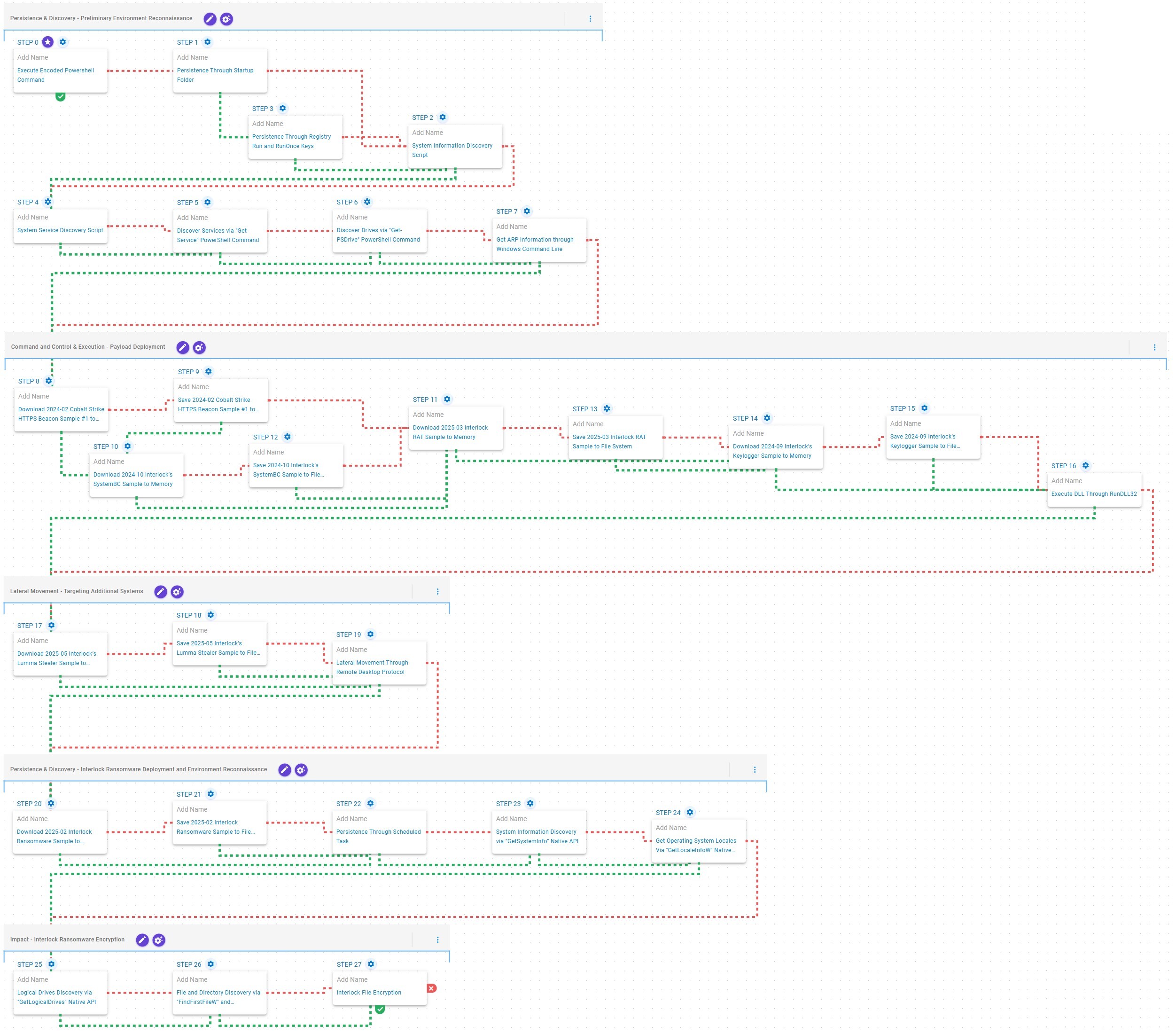
This attack graph emulates the Tactics, Techniques and Procedures (TTPs) exhibited by Interlock ransomware during its most recent activities. It is based on the Cybersecurity Advisory (CSA) released by CISA on July 22, 2025, and supported by reports published by Sekoia on April 26, 2025, and by Cisco Talos on November 7, 2024.
Persistence & Discovery – Preliminary Environment Reconnaissance
 Click for Larger
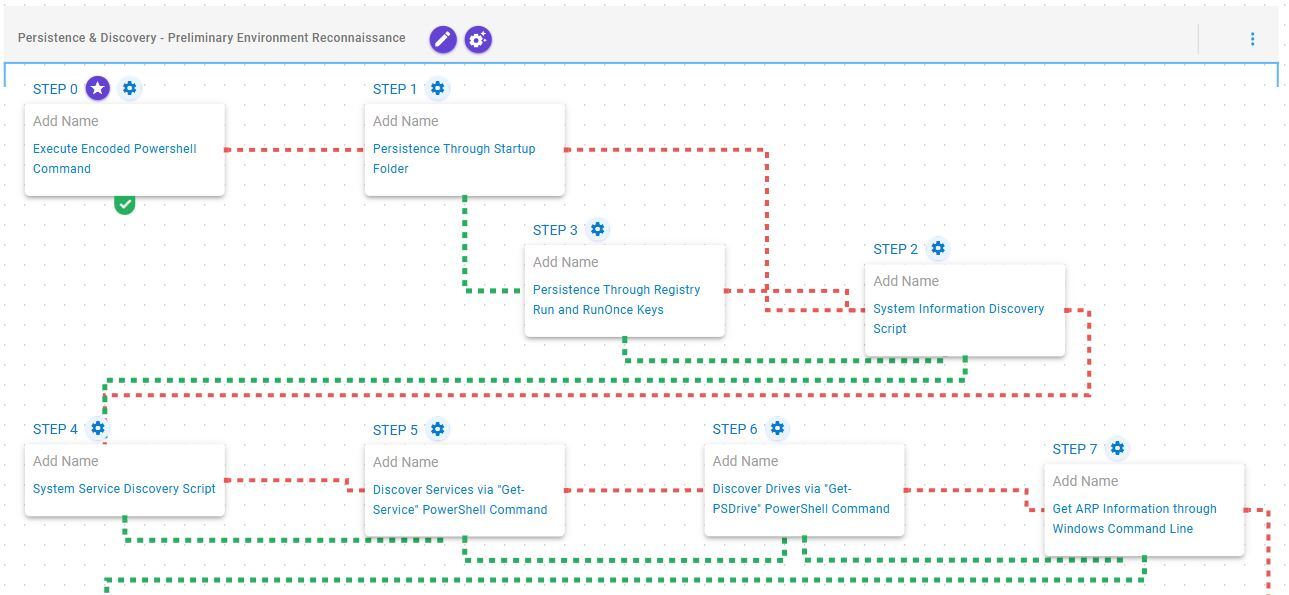
This stage begins with the execution of a Base64-encoded PowerShell command, employed by Interlock operators to download the next-stage payload. Following payload retrieval, the emulation attempts to establish persistence via the Windows Startup folder. If this method fails, it resorts to creating a Windows Registry Run key named “Chrome Updater”.
Subsequently, it performs preliminary environment reconnaissance, which includes collecting system information, enumerating services associated with active processes, identifying available drives, and retrieving Address Resolution Protocol (ARP) table entries.
Command and Scripting Interpreter: PowerShell (T1059.001): This scenario encodes a user-defined PowerShell script into base64 and then executes it using PowerShell's -encodedCommand parameter.
Logon Autostart Execution: Registry Run Keys / Startup Folder (T1547.001): This scenario creates a LNK file in the Startup folder that would execute at the next Logon for all users.
Logon Autostart Execution: Registry Run Keys / Startup Folder (T1547.001): This scenario creates an entry under HKLM\Software\Microsoft\Windows\CurrentVersion\Run to establish persistence on the system.
System Information Discovery (T1082): This scenario executes the native systeminfo command to retrieve all the Windows system information.
System Service Discovery (T1007): This scenario executes the tasklist /svc command to enumerate all running services.
System Service Discovery (T1007): This scenario executes the Get-Service PowerShell cmdlet to enumerate a list of running and stopped services.
System Network Configuration Discovery (T1016): This scenario executes the arp –a command to obtain the system’s Address Resolution Protocol (ARP) information.
Command and Control & Execution – Payload Deployment
 Click for Larger
This stage focuses on the deployment of payloads leveraged by Interlock operators to establish and maintain Command and Control (C2) communication. It begins with an attempt to deploy Cobalt Strike, a widely used post-exploitation framework. If prevented, the emulation resorts to implementing SystemBC, a SOCKS5 proxy utility used to obfuscate network traffic.
Subsequently, Interlock RAT is deployed to facilitate continued C2 communication and enable reverse shell functionality, granting operators interactive control over the compromised host. Finally, a keylogger component is deployed and executed using RunDLL32, enabling the capture of keystrokes and sensitive user input.
Ingress Tool Transfer (T1105): This scenario downloads to memory and saves to disk in independent scenarios to test network and endpoint controls and their ability to prevent the delivery of known malicious samples.
System Binary Proxy Execution: Rundll32 (T1218.011): This scenario executes an export function from an AttackIQ DLL using the RunDll32 Windows utility.
Lateral Movement – Targeting Additional Systems
 Click for Larger
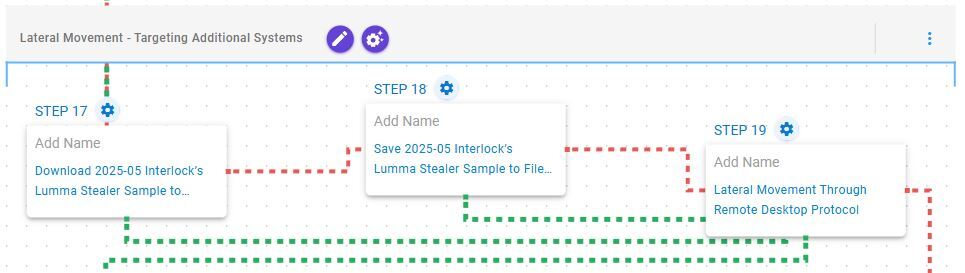
This stage begins with the deployment of Lumma Stealer, also known as LummaC2, a credential-harvesting malware employed to extract sensitive information from the compromised system. Subsequently, the emulation initiates lateral movement via Remote Desktop Protocol (RDP), enabling propagation to adjacent hosts within the network.
Remote Services: Remote Desktop Protocol (T1021.001): This scenario attempts to remotely connect to an accessible system via Remote Desktop Protocol (RDP), a built-in remote access Windows utility.
The subsequent stages of this emulation correspond with those defined in the following microemulation of Interlock ransomware.
[Malware Emulation] Interlock Ransomware – 2025-07 – Associated Tactics, Techniques and Procedures (TTPs)
 Click for Larger
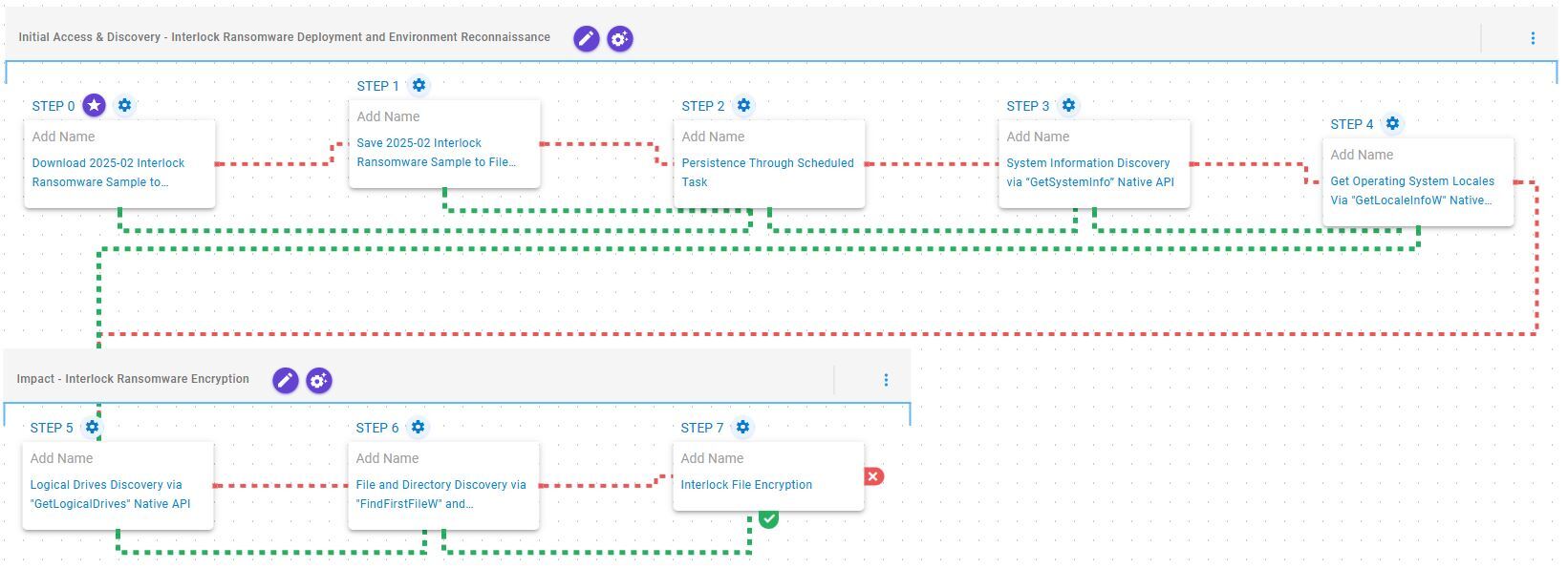
This emulation replicates the sequence of behaviors associated with the deployment of Interlock ransomware on a compromised system with the intent of providing customers with the opportunity to detect and/or prevent a compromise in progress.
Initial Access & Discovery – Interlock Ransomware Deployment and Environment Reconnaissance
 Click for Larger
This stage begins with the deployment of the Interlock ransomware, which, once operational, establishes persistence by creating a scheduled task named TaskSystem. Following this, it retrieves basic system information by invoking the GetSystemInfo API and determines the system’s location through the GetLocaleInfoW API.
Ingress Tool Transfer (T1105): This scenario downloads to memory and saves to disk in independent scenarios to test network and endpoint controls and their ability to prevent the delivery of known malicious samples.
Scheduled Task/Job: Scheduled Task (T1053.005): This scenario acquires persistence through the creation of a new scheduled task using the schtasks utility.
System Information Discovery (T1082): This scenario executes the GetSystemInfo Native API call to retrieve information associated to the system.
System Location Discovery (T1614): This scenario executes the GetLocaleInfoW Windows API to retrieve the user’s default country locale code from the system.
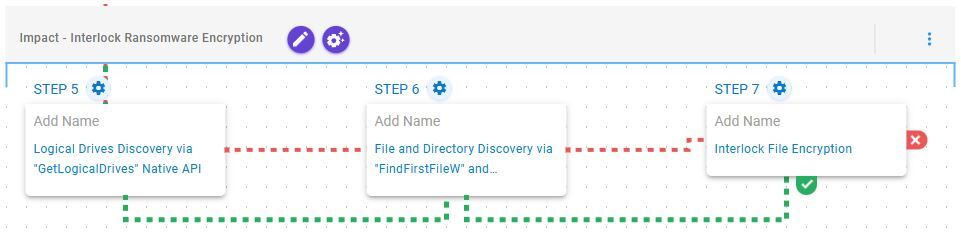
Impact – Interlock Ransomware Encryption
 Click for Larger
This stage begins with the enumeration of available drives via the GetLogicalDrives API, followed by systematic traversal of each volume through the FindFirstFileW and FindNextFileW APIs to locate files of interest. Once completed, it encrypts the identified files using a combination of AES-128 in CBC Mode for file encryption with RSA-1024 for key encryption.
System Information Discovery (T1082): This scenario executes the GetLogicalDrives Windows API call to retrieve the currently available disk drives.
File and Directory Discovery (T1083): This scenario will call the FindFirstFileW and FindNextFileW Windows API to perform the enumeration of the file system.
Data Encrypted for Impact (T1486): This scenario performs the file encryption routines used by common ransomware families. Files matching an extension list are identified and encrypted in place using similar encryption algorithms as used by Interlock ransomware.
Opportunities to Expand Emulation Capabilities
In addition to the released assessment template, AttackIQ recommends the following existing scenario to extend the emulation of the capabilities exhibited in this advisory:
Kerberoasting using Obfuscated Rubeus: This scenario implements the Kerberoasting technique using Rubeus, which allows an attacker to attempt to extract password hashes for accounts using their Service Principal Name (SPN) ticket.
Detection and Mitigation Opportunities
Given the number of different techniques being utilized by this threat, it can be difficult to know which to prioritize for prevention and detection opportunities. AttackIQ recommends first focusing on the following techniques emulated in our scenarios before moving on to the remaining techniques.
1. Review CISA’s Patching and Detection Recommendations:
CISA has provided a significant number of recommendations for the best ways to defend yourself from these and similar attacks. AttackIQ strongly recommends reviewing the detection and mitigation recommendations to adapt them to your environment first to determine if you have any existing impact before reviewing the assessment results.
2. Ingress Tool Transfer (T1105):
Adversaries depend on the deployment of payloads, often across multiple stages, within targeted environments to achieve their objectives. Given this dependency, it is essential to employ both Endpoint and Network security controls to detect and block these throughout the multiple phases of delivery and execution.
2a. Detection
The following signatures can help identify when native utilities are being used to download malicious payloads.
PowerShell Example:
Process Name == (Cmd.exe OR Powershell.exe)
Command Line CONTAINS ((“IWR” OR “Invoke-WebRequest") AND “DownloadData” AND “Hidden”)
2b. Mitigation
MITRE ATT&CK has the following mitigation recommendations.
3. System Binary Proxy Execution: Rundll32 (T1218.011):
Adversaries may use DLL files for many of their malware payloads and leverage a native Windows utility to execute them. The primary native method for executing these files is to call the RunDll32 tool and pass along the path and export function to be executed.
3a. Detection
While this tool is commonly used by legitimate applications, there are behaviors related to their execution that can stand out in your process logs. Searching for files that are being executed from temporary directories, that don’t have the standard .dll file extension or call strange looking export names can stand out from regular user behavior.
Process Name == (rundll32.exe)
Command Line CONTAINS (‘TEMP’ OR ‘.png’ OR ‘Roaming’ OR ‘%APPDATA%’)
Current Directory CONTAINS (‘D:\’ OR ‘E:\’)
3b. Mitigation
MITRE ATT&CK recommends the following mitigation recommendation:
Wrap-up
In summary, these emulations will evaluate security and incident response processes and support the improvement of your security control posture against the recent activities carried out by Interlock ransomware operators. With data generated from continuous testing and use of this assessment template, you can focus your teams on achieving key security outcomes, adjust your security controls, and work to elevate your total security program effectiveness against a widely distributed and dangerous threat.
AttackIQ, the leading provider of Adversarial Exposure Validation (AEV) solutions, is trusted by top organizations worldwide to validate security controls in real time. By emulating real-world adversary behavior, AttackIQ closes the gap between knowing about a vulnerability and understanding its true risk. AttackIQ’s AEV platform aligns with the Continuous Threat Exposure Management (CTEM) framework, enabling a structured, risk-based approach to ongoing security assessment and improvement. The company is committed to supporting its MSSP partners with a Flexible Preactive Partner Program that provides turn-key solutions, empowering them to elevate client security. AttackIQ is passionate about giving back to the cybersecurity community through its free award-winning AttackIQ Academy and founding research partnership with MITRE Center for Threat-Informed Defense.