Qilin is a ransomware strain operated under the Ransomware-as-a-Service (RaaS) model that emerged in July 2022. Initially operated under the moniker Agenda, its codebase was written primarily in Go (Golang), focused on Windows environments, and implemented basic double extortion capabilities. Over time, the ransomware evolved into Qilin, rewritten in Rust, which provided enhanced performance, cross-platform compatibility, and more sophisticated evasion techniques. This transition allowed the operators to expand targeting Linux and ESXi environments, incorporate advanced mechanisms to bypass endpoint protections, improve encryption efficiency, and enable modular deployment for affiliates.
Qilin rapidly grew to be one of the most prominent ransomware groups in 2025, surpassing RansomHub in Q2, which was the leading ransomware for the previous three quarters. Qilin’s objectives include various sectors, notably healthcare, education, and government, with high-profile incidents such as the 2024 attack on Synnovis, a UK-based medical laboratory, which disrupted services at several National Health Service (NHS) hospitals.
Its operators employ advanced techniques such as Bring Your Own Vulnerable Driver (BYOVD) to disable Endpoint Detection and Response (EDR) solutions, the ability to reboot systems in Safe Mode to evade defenses, and the deletion of shadow copies to prevent recovery. Qilin employs a combination of AES-256 and RSA-2048 encryption algorithms to encrypt files, making recovery without the decryption key virtually impossible.
AttackIQ previously released an attack graph emulating the behaviors exhibited by Qilin Ransomware on October 2, 2025. AttackIQ has now introduces a revised attack graph that incorporates the latest Tactics, Techniques and Procedures (TTPs) associated with the deployment of Qilin ransomware to help customers validate their security controls and their ability to defend against this determined adversary.
Validating your security program performance against these behaviors is vital in reducing risk. By using this updated attack graph in the AttackIQ Adversarial Exposure Validation (AEV) Platform, security teams will be able to:
- Evaluate security control performance against baseline behaviors associated with the Qilin ransomware.
- Assess their security posture against an opportunistic adversary, which does not discriminate when it comes to selecting its targets.
- Continuously validate detection and prevention pipelines against a playbook similar to those of many of the groups currently focused on ransomware activities.
[Malware Emulation] Qilin Ransomware – 2025-10 – Associated Tactics, Techniques and Procedures (TTPs)
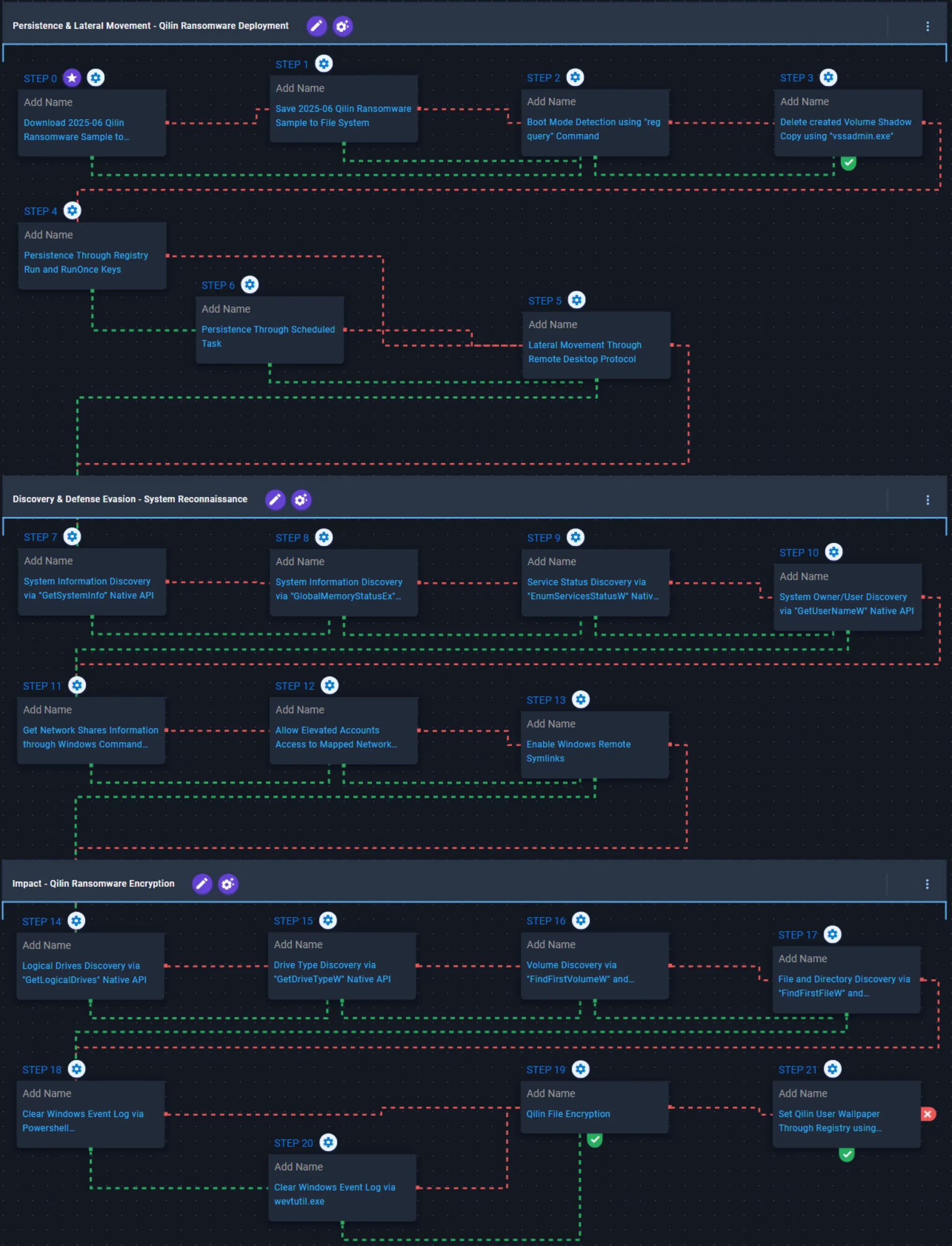
This emulation replicates the sequence of behaviors associated with the deployment of Qilin ransomware on a compromised system with the intent of providing customers with the opportunity to detect and/or prevent a compromise in progress. It is supported by reporting from Trend Micro (August 25, 2022, and December 16, 2022), Group-IB (July 17, 2024), and Cisco Talos on (October 26, 2025).
To highlight updates from the previous version of the emulation, newly introduced scenarios are labeled with the “Added!” prefix, ensuring clear and easy identification.
Persistence & Lateral Movement – Qilin Ransomware Deployment
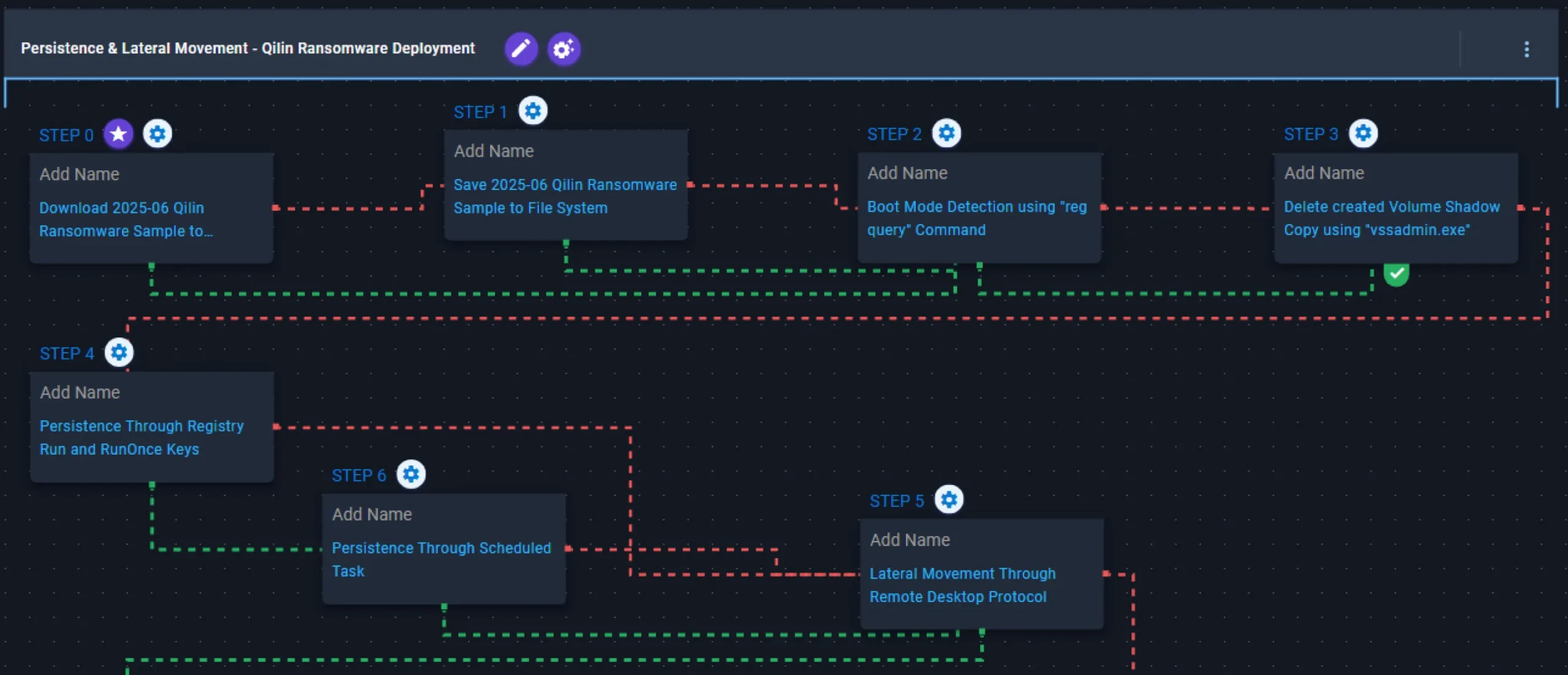
This stage begins with the deployment of Qilin ransomware, which initially determines the system’s boot mode by querying the SystemStartOptions registry key. Following validation, it executes vssadmin.exe to delete existing Volume Shadow Copies, effectively preventing system recovery.
Subsequently, it attempts to establish persistence via Run or RunOnce registry keys. If any of these methods fail, it resorts to creating a scheduled task named TVInstallRestore. Once completed, it performs lateral movement to remotely accessible systems through Remote Desktop Protocol (RDP).
2025-06 Qilin Ransomware Sample (T1105): The Qilin Ransomware Sample (SHA256: e90bdaaf5f9ca900133b699f18e4062562148169b29cb4eb37a0577388c22527) is downloaded and saved to disk in two separate scenarios to test network and endpoint controls and their ability to prevent the delivery of known malicious samples.
Boot Mode Detection using “reg query” Command (T1012): This scenario queries the SystemStartOptions registry key to uncover specific details about how the system is configured to start, for example to detect if the system was booted in Safe Mode.
Delete created Volume Shadow Copy using “vssadmin.exe” (T1490): This scenario executes the vssadmin.exe utility to delete a Volume Shadow Copy created by the emulation.
Persistence Through Registry Run and RunOnce Keys (T1547.001): This scenario creates an entry under HKLM\Software\Microsoft\Windows\CurrentVersion\Run to establish persistence on the system.
Added! Persistence Through Registry Run and RunOnce Keys (T1547.001): This scenario creates an entry under HKLM\Software\Microsoft\Windows\CurrentVersion\RunOnce to establish persistence on the system.
Added! Persistence Through Scheduled Task (T1053.005): This scenario acquires persistence through the creation of a scheduled task named TVInstallRestore using the schtasks utility.
Lateral Movement Through Remote Desktop Protocol (T1021.001): This scenario attempts to remotely connect to an accessible system via Remote Desktop Protocol (RDP), a built-in remote access Windows utility.
Discovery & Defense Evasion – System Reconnaissance
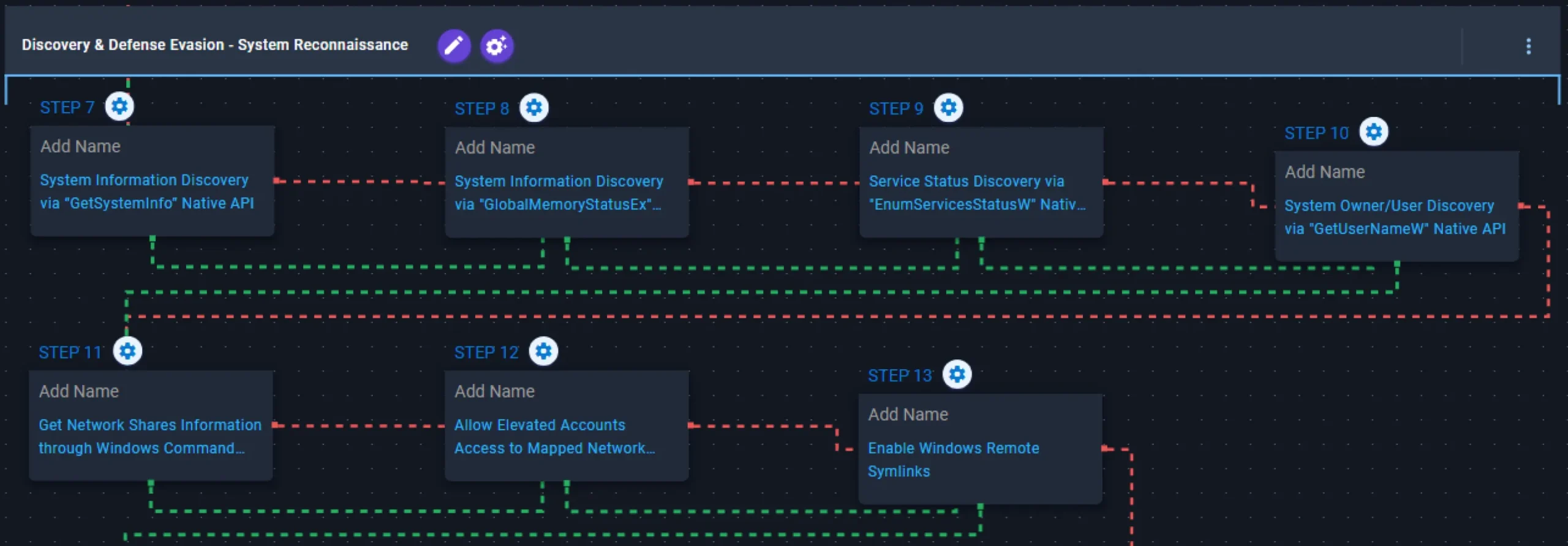
This stage begins with environment reconnaissance, during which it collects general system information via the GetSystemInfo and GlobalMemoryStatusEx APIs, enumerates service status through EnumServicesStatusW, retrieves the current username using GetUserNameW, and enumerates network share information using the net utility.
To ensure elevated accounts can access mapped network drives during encryption, it modifies the EnableLinkedConnections registry key, allowing mapped drives to remain accessible even within User Account Control (UAC)–elevated processes. After this, it abuses Windows remote symbolic links, enabling both Remote-to-Local and Remote-to-Remote symlink creation through the fsutil command to expand the scope of accessible resources.
System Information Discovery via “GetSystemInfo” Native API (T1082): This scenario executes the GetSystemInfo Windows API call to retrieve information associated with the system.
System Information Discovery via “GlobalMemoryStatusEx” Native API (T1082): This scenario executes the GlobalMemoryStatusEx Windows API call to gather information regarding physical and virtual memory.
Service Status Discovery via “EnumServicesStatusW” Native API (T1007): This scenario executes the EnumServiceStatusW Windows API to gather critical information regarding configured services.
System Owner/User Discovery via “GetUserNameW” Native API (T1033): This scenario executes the GetUserNameW Windows API call to retrieve the name of the user associated with the current thread.
Added! Get Network Shares Information through Windows Command Line (T1135): This scenario executes the net use utility to obtain information regarding the system’s available network shares.
Allow Elevated Accounts Access to Mapped Network Drives via Registry (T1112): This scenario modifies the EnableLinkedConnections registry key to ensure mapped drives remain accessible even within User Account Control (UAC)–elevated processes.
Added! Enable Windows Remote Symlinks (T1222.001): This scenario enables the Remote to Local and Remote to Remote symbolic links through the fsutil behavior set SymlinkEvaluation command.
Impact – Qilin Ransomware Encryption
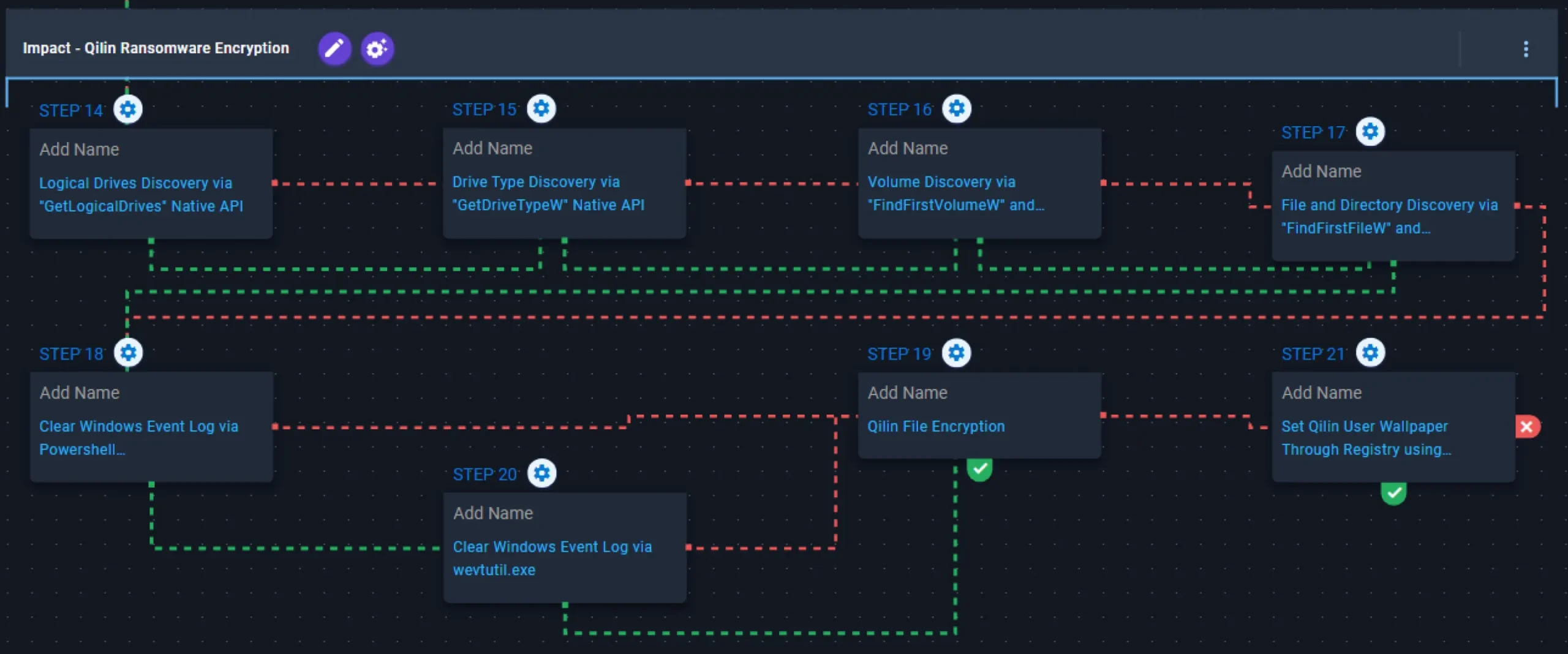
This stage begins with the identifying of available drives using GetLogicalDrives and determining their types via the GetDriveTypeW API, followed by enumerating volumes through FindFirstVolumeW and FindNextVolumeW APIs, and continuing with filesystem traversal and file enumeration through the FindFirstFileW and FindNextFileW APIs. After enumeration, it clears Windows event logs using PowerShell, resorting to wevtutil.exe if unsuccessful. Finally, Qilin encrypts the identified files using a combination of AES-256 in CTR mode for file encryption and RSA-2048 for key encryption.
Added! Logical Drives Discovery via “GetLogicalDrives” Native API (T1680): This scenario executes the GetLogicalDrives Windows API to retrieve the currently available disk drives.
Drive Type Discovery via “GetDriveTypeW” Native API (T1680): This scenario executes the GetDriveTypeW Windows API call to retrieve information regarding the system’s physical drives.
Volume Discovery via “FindFirstVolumeW” and “FindNextVolumeW” Native API (T1680): This scenario executes the FindFirstVolumeW and FindNextVolumeW Windows API calls to iterate through the available volumes of the system.
File and Directory Discovery via “FindFirstFileW” and “FindNextFileW” Native API (T1083): This scenario executes the FindFirstFileW and FindNextFileW Windows APIs to enumerate the file system.
Clear Windows Event Log via Powershell GlobalSession.ClearLog (T1070.001): This scenario employs the GlobalSession.ClearLog Powershell cmdlet to clear Windows Event Logs from the system.
Clear Windows Event Log via wevtutil.exe (T1070.001): The scenario employs the wevtutil.exe utility to clear Windows Event Logs from the system.
Qilin File Encryption (T1486): This scenario performs the file encryption routines used by common ransomware families. Files matching an extension list are identified and encrypted in place using similar encryption algorithms as used by Qilin ransomware.
Added! Set Qilin User Wallpaper Through Registry using “reg.exe” (T1112): This scenario sets the Wallpaper registry key in HKCU\Control Panel\Desktop to modify the desktop background.
Opportunities to Expand Emulation Capabilities
In addition to the released attack graph, AttackIQ recommends the following scenario to extend the emulation of the capabilities exhibited by Qilin Ransomware:
- Execute Power Shell Script in Remote System with PaExec: This scenario simulates the execution of a PowerShell script on a remote machine using PaExec, an open-source version of PSExec.
- Domain Controller Remote System Discovery via Powershell Script: This scenario executes the PowerShell
Get-ADComputercmdlet to get the list of Active Directory computers, showing the name, hostname and installed operating system.
Wrap-up
In summary, this emulation will evaluate security and incident response processes and support the improvement of your security control posture against the behaviors exhibited by Qilin ransomware. With data generated from continuous testing and use of this assessment template, you can focus your teams on achieving key security outcomes, adjust your security controls, and work to elevate your total security program effectiveness against a known and dangerous threat.
AttackIQ, the leading provider of Adversarial Exposure Validation (AEV) solutions, is trusted by top organizations worldwide to validate security controls in real time. By emulating real-world adversary behavior, AttackIQ closes the gap between knowing about a vulnerability and understanding its true risk. AttackIQ’s AEV platform aligns with the Continuous Threat Exposure Management (CTEM) framework, enabling a structured, risk-based approach to ongoing security assessment and improvement. The company is committed to supporting its MSSP partners with a Flexible Preactive Partner Program that provides turn-key solutions, empowering them to elevate client security. AttackIQ is passionate about giving back to the cybersecurity community through its free award-winning AttackIQ Academy and founding research partnership with MITRE Center for Threat-Informed Defense.


![[CISA AA25-203A] #StopRansomware: Interlock](https://www.attackiq.com/wp-content/uploads/2025/07/col-blg-aa25-203a-bg-768x432.webp)