Ako, also known as MedusaReborn, is a ransomware strain written in C++ that has been active since at least January 2020. It is operated under the Ransomware-as-a-Service (RaaS) business model, allowing multiple adversaries to deploy it in exchange for a share of the proceeds of successful attacks.
The strain is considered a variant of MedusaLocker, as it shares numerous similarities with its predecessor, including defensive behavior and targeted isolation of specific machines for encryption.
Validating your security program performance against these behaviors is vital in reducing risk. By using this new assessment template in the AttackIQ Security Optimization Platform, security teams will be able to:
- Evaluate security control performance against baseline behaviors associated with the Ako ransomware.
- Assess their security posture against an opportunistic adversary, which does not discriminate when it comes to selecting its targets.
- Continuously validate detection and prevention pipelines against a playbook similar to those of many of the groups currently focused on ransomware activities.
[Malware Emulation] Ako Ransomware – 2020-01 – Associated Tactics, Techniques and Procedures (TTPs)
On January 9, 2020, a BleepingComputer user posted on their forums about an unknown ransomware strain that had encrypted both its Windows 10 system and Windows SBS 2011 server. The following day, BleepingComputer published a report describing and analyzing a sample of such ransomware, which targeted entire networks rather than individual workstations.
 Click for Larger
This attack graph seeks to emulate the sequence of behaviors associated with the deployment of Ako ransomware on a compromised system with the intent of providing customers with opportunities to prevent and/or detect a compromise in progress.
The assessment template is based on behaviors reported by BleepingComputer on January 10, 2020, and Hybrid-Analysis on September 25, 2024.
Execution & Discovery – Environment Reconnaissance for Execution Guardrailing
 Click for Larger
This stage focuses on the deployment of Ako ransomware which, once operational, will perform environment reconnaissance to identify the location of the compromised system through Windows API calls.
Ingress Tool Transfer (T1105): This scenario downloads to memory and saves to disk in independent scenarios to test network and endpoint controls and their ability to prevent the delivery of known malicious samples.
Process Injection (T1055): This scenario performs process injection by allocating memory in a running process with VirtualAlloc, writing shellcode to that memory space, and then changing the memory protection option with VirtualProtect.
System Location Discovery (T1614): This stage executes the GetSystemDefaultLCID, GetLocaleInfoA, and GetUserDefaultLocaleName Windows API calls to make a language discovery of the system
Impact & Discovery – Local Network Discovery
 Click for Larger
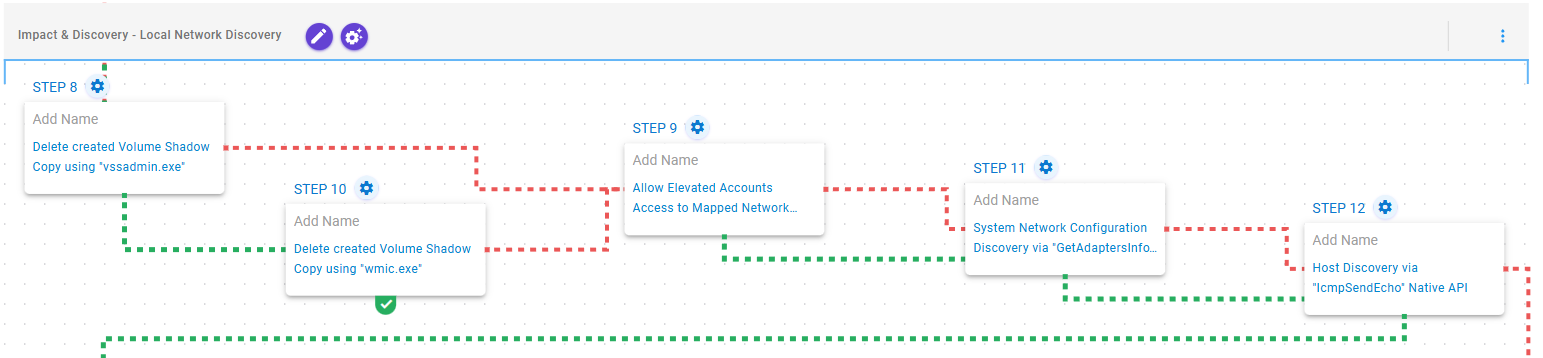
This stage begins with the deletion of volume shadow copies using vssadmin.exe and in case of failure, through Windows Management Instrumentation (WMI) commands. Upon success, it modifies the registry to enable access to mapped network drives, discovers the network configuration, and performs network reconnaissance using Windows API calls.
Inhibit System Recovery (T1490): This scenario executes the vssadmin.exe utility to delete a recent Volume Shadow Copy created by the assessment template.
Inhibit System Recovery (T1490): This scenario executes the wmic.exe utility to delete a recent Volume Shadow Copy created by the assessment template.
Modify Registry (T1112): This scenario modifies the HKLM\SOFTWARE\Microsoft\Windows\CurrentVersion\Policies\System\EnableLinkedConnections registry value to allow elevated accounts access to mapped network drives.
System Network Configuration Discovery (T1016): This scenario executes GetAdaptersInfo Windows Native API call to retrieve adapter information from the local computer.
Remote System Discovery (T1018): This scenario executes the IcmpSendEcho Windows API call to perform a discovery scan on local networks.
Impact – Ako Ransomware Encryption
 Click for Larger
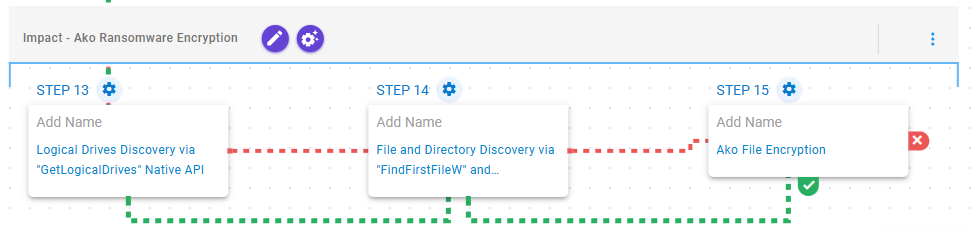
This stage focuses on discovering drives, directories and files with the goal of encrypting them using a combination of RSA and AES-256 in CBC mode.
Peripheral Device Discovery (T1120): This scenario retrieves information about the system’s physical disks using the GetLogicalDriveStringsW API call.
File and Directory Discovery (T1083): This scenario will call the FindFirstFileW and FindNextFileW Windows API to perform the enumeration of the file system.
Data Encrypted for Impact (T1486): This scenario performs the file encryption routines used by common ransomware families. Files matching an extension list are identified and encrypted in place using similar encryption algorithms as used by Ako ransomware.
Detection and Mitigation Opportunities
Given the number of different techniques being utilized by this threat, it can be difficult to know which to prioritize for prevention and detection opportunities. AttackIQ recommends first focusing on the following techniques emulated in our scenarios before moving on to the remaining techniques.
1. Ingress Tool Transfer (T1105):
This actor relies heavily in downloading additional stages of malware. Endpoint and Network security controls should both be employed to try and detect the delivery of these malicious payloads.
1a. Detection
The following signatures can help identify when native utilities are being used to download malicious payloads.
PowerShell Example:
Process Name == (Cmd.exe OR Powershell.exe)
Command Line CONTAINS ((“IWR” OR “Invoke-WebRequest") AND “DownloadData” AND “Hidden”)
1b. Mitigation
MITRE ATT&CK has the following mitigation recommendations.
2. Process Injection (T1055):
Malware will commonly inject malicious code into legitimate running processes to attempt to blend in with legitimate applications to remain hidden and appear normal to the compromised system.
2a. Detection
Searching for common processes that are performing uncommon actions can help identify when a process has been compromised.
2b. Mitigation
MITRE ATT&CK recommends the following mitigation recommendations:
3. Inhibit System Recovery (T1490):
Adversaries often delete Volume Shadow Copies to prevent the possibility of restoring files back to their original state. This is a common technique used by ransomware as it prevents the recovery of files once the ransomware encryption routine successfully completes execution.
3a. Detection
Detecting deletion of Volume Shadow Copies is usually the first step that occurs and can be detected by looking at the command line activity
Process Name == (cmd.exe OR powershell.exe)
Command Line CONTAINS (“vssadmin” AND “Delete Shadows”)
3b. Mitigation
MITRE ATT&CK has the following mitigation recommendations for Inhibit System Recovery
4. Data Encrypted for Impact (T1486):
Preventing systems and files from being encrypted should be a top priority. Ensuring that you have layered endpoint defenses including Antivirus and EDR solutions is critical.
4a. Detection
Ransomware attacks are best prevented and alerted by your EDR/AV Policies. Typically, a configuration for ransomware protection is presented and we strongly encourage that it is enabled in your security controls.
There are three telling signs of ransomware activity in an environment that you could query for and possibly make preventative detections if your security controls allow. Those three are deletion of shadow volumes, suspicious amounts of exfiltrated data, and of course, wide set file encryption.
Detecting deletion of shadow volumes is usually the first step that occurs and can be detected by looking at command line activity:
Via vssadmin.exe:
Process Name == (cmd.exe OR powershell.exe)
Command Line CONTAINS (“vssadmin” AND “Delete Shadows”)
Via PowerShell:
Process Name == powershell.exe
Command Line == “Get-WmiObject Win32_Shadowcopy | ForEach-Object ($_.Delete();)”
Detecting suspicious Data Exfiltration:
Detecting exfiltration is well suited for IDS/IPS and DLP solutions. These products should be configured to identify sensitive files. If sensitive files, or a large amount of web traffic is sent to a rare external IP, it should be detected or prevented depending on security policies for the security control. Historical NetFlow data logging can also bubble up hosts that are experience uncommon peaks in outgoing traffic.
Detecting Ransomware-like File Encryption:
Utilizing an EDR or SIEM/SOAR product can help detect and prevent suspicious file encryption related to ransomware attacks. Utilizing these tools to look for excessive file modifications (greater than 1000 on a system) within less than a minute of time is a good starting indicator.
To increase the fidelity, you could include file modification of file extensions to popular ransomware extensions such as .conti, .Locky, .Ryuk, etc. If possible, with a SOAR or preventative EDR platform, we recommend setting these detections to kill all processes involved in creating the alert as it will most likely stop the spread of the Ransomware.
4b. Mitigation
MITRE ATT&CK Recommends the following mitigations:
Wrap-up
In summary, this attack graph will evaluate security and incident response processes and support the improvement of your security control posture against the behaviors exhibited by Ako ransomware operators. With data generated from continuous testing and use of this assessment template, you can focus your teams on achieving key security outcomes, adjust your security controls, and work to elevate your total security program effectiveness against a known and dangerous threat.
AttackIQ offers a comprehensive Breach and Attack Simulation Platform to assist security teams. This includes AttackIQ Flex, a tailored pay-as-you-go service; AttackIQ Ready!, a fully managed service for continuous security optimization; and AttackIQ Enterprise, a co-managed service offering enhanced support. These services ensure your team maintains a robust security posture.