Cephalus is a ransomware strain developed in Go, with early victim activity reported as far back as June 2025 and public reporting surfacing in August. The group primarily gains initial access through exposed RDP services without multi-factor authentication (MFA), often using stolen credentials, and operates under a double-extortion model by exfiltrating sensitive data prior to encryption.
The ransomware targets Windows environments and uses a hybrid encryption scheme combining AES for file encryption and RSA for key protection, while incorporating multiple evasion and anti-analysis techniques, including fake AES key generation, secure memory handling, and DLL sideloading using legitimate executables. To hinder recovery and maximize impact, Cephalus disables Windows Defender’s real-time protections, terminates backup and database services, deletes shadow copies, and publishes proof of data theft to intensify extortion pressure.
AttackIQ has released a new attack graph that emulates the Tactics, Techniques, and Procedures (TTPs) associated with the deployment of Cephalus ransomware to help customers validate their security controls and their ability to defend against this threat.
Validating your security program performance against these behaviors is vital in reducing risk. By using this new emulation in the AttackIQ Adversarial Exposure Validation (AEV) Platform, security teams will be able to:
- Evaluate security control performance against baseline behaviors associated with the Cephalus ransomware.
- Assess their security posture against an opportunistic adversary, which does not discriminate when it comes to selecting its targets.
- Continuously validate detection and prevention pipelines against a playbook similar to those of many of the groups currently focused on ransomware activities.
[Malware Emulation] Cephalus Ransomware – 2025-08 – Associated Tactics, Techniques and Procedures (TTPs)
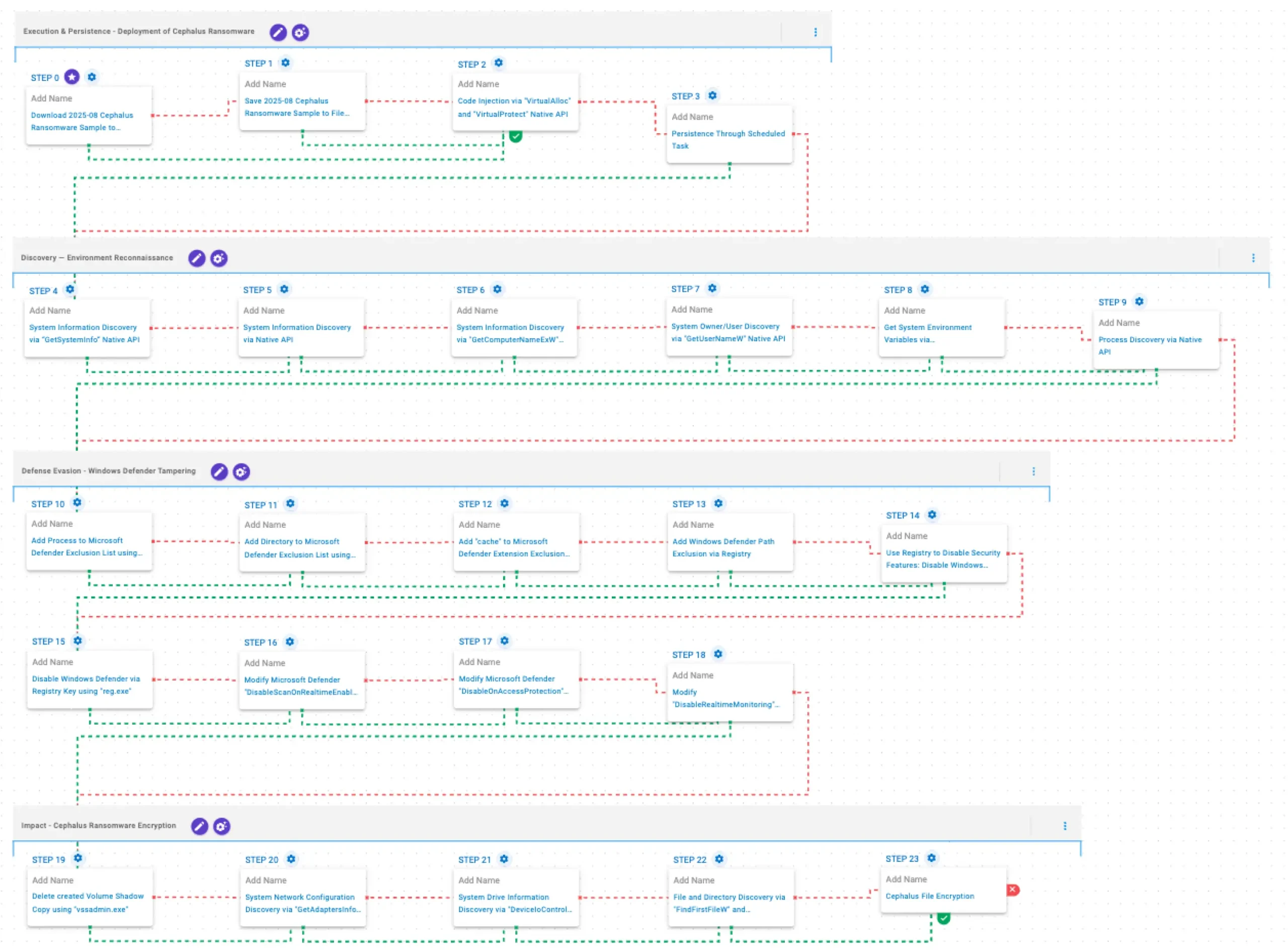
This emulation replicates the sequence of behaviors associated with the deployment of Cephalus ransomware on a compromised system with the intent of providing customers with the opportunity to detect and/or prevent a compromise in progress.
The emulation is based on the behaviors reported by Huntress on August 21, 2025, and by Ahnlab in December 2025, as well as internal analysis.
Execution & Persistence – Deployment of Cephalus Ransomware
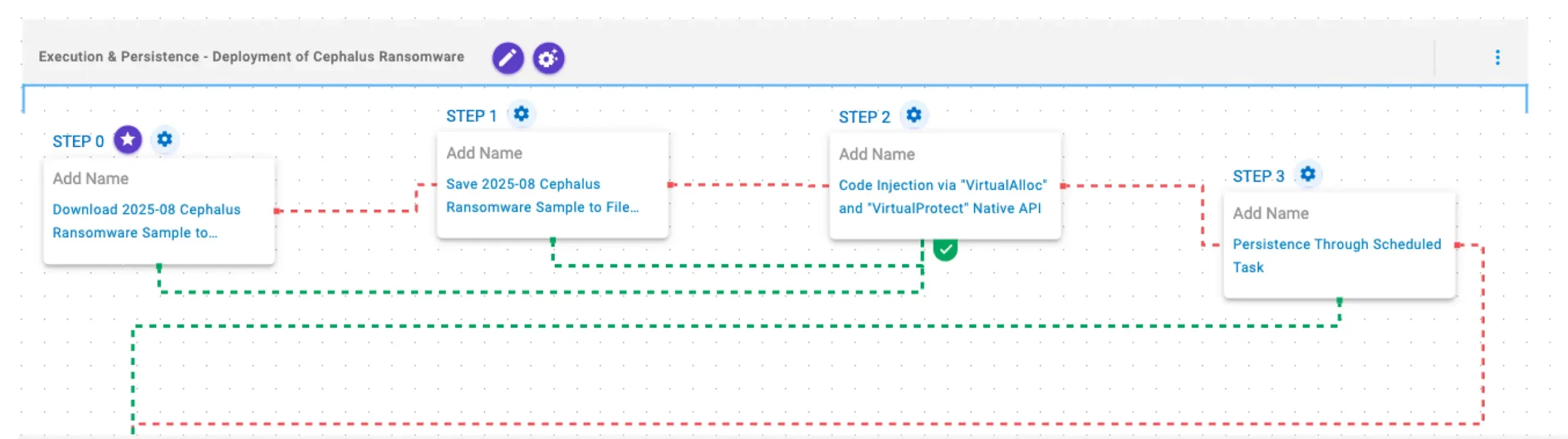
This stage begins with the deployment of the Cephalus ransomware through process injection using the VirtualAlloc and VirtualProtect APIs to execute its payload within a legitimate process. Finally, Cephalus establishes persistence by creating scheduled tasks to ensure execution after system reboots.
2025-08 Cephalus Ransomware Sample (T1105): The Cephalus Ransomware Sample (SHA256: a34acd47127196ab867d572c2c6cf2fcccffa3a7a87e82d338a8efed898ca722) is saved to disk in two separate scenarios to test network and endpoint controls and their ability to prevent the delivery of known malicious samples.
Code Injection via “VirtualAlloc” and “VirtualProtect” Native API (T1055): This scenario performs process injection by allocating memory in a running process with VirtualAlloc, writing shellcode to that memory space, and then changing the memory protection option with VirtualProtect.
Persistence Through Scheduled Task (T1053.005): This scenario creates a new scheduled task for persistence using the schtasks utility.
Discovery & Defense Evasion — Environment Reconnaissance

In this stage, Cephalus gathers system and user information using the GetSystemInfo, RtlGetVersion, GetComputerNameExW, and GetUserNameW APIs. It then enumerates environment variables through the GetEnvironmentStrings API and lists running processes using the CreateToolhelp32Snapshot, Process32FirstW, and Process32NextW APIs.
System Information Discovery via “GetSystemInfo” Native API (T1082): This scenario executes the GetSystemInfo Windows native API call to retrieve system information. This can be used to detect sandboxes, create unique identifiers, and adjust execution behaviors.
System Information Discovery via Native API (T1082): This scenario executes RtlGetVersion, and NetWkstaGetInfo Windows native API calls to enumerate system information.
System Information Discovery via “GetComputerNameExW” Native API (T1082): This scenario executes the GetComputerNameExW Windows native API call to retrieve a NetBIOS or DNS name associated with the local computer.
System Owner/User Discovery via “GetUserNameW” Native API (T1033): This scenario executes the GetUserNameW Windows native API call to retrieve the account name associated with the local computer.
Get System Environment Variables via “GetEnvironmentStrings” Native API (T1082): This scenario executes the GetEnvironmentStrings Windows native API call to discover environmental variables, usually used to fingerprint the system or search for stored passwords and secrets.
Process Discovery via Native API (T1057): This scenario executes the CreateToolhelp32SnapshotWindows native API call to receive a list of running processes and iterates through each process object with Process32FirstW and Process32NextW.
Defense Evasion – Windows Defender Tampering
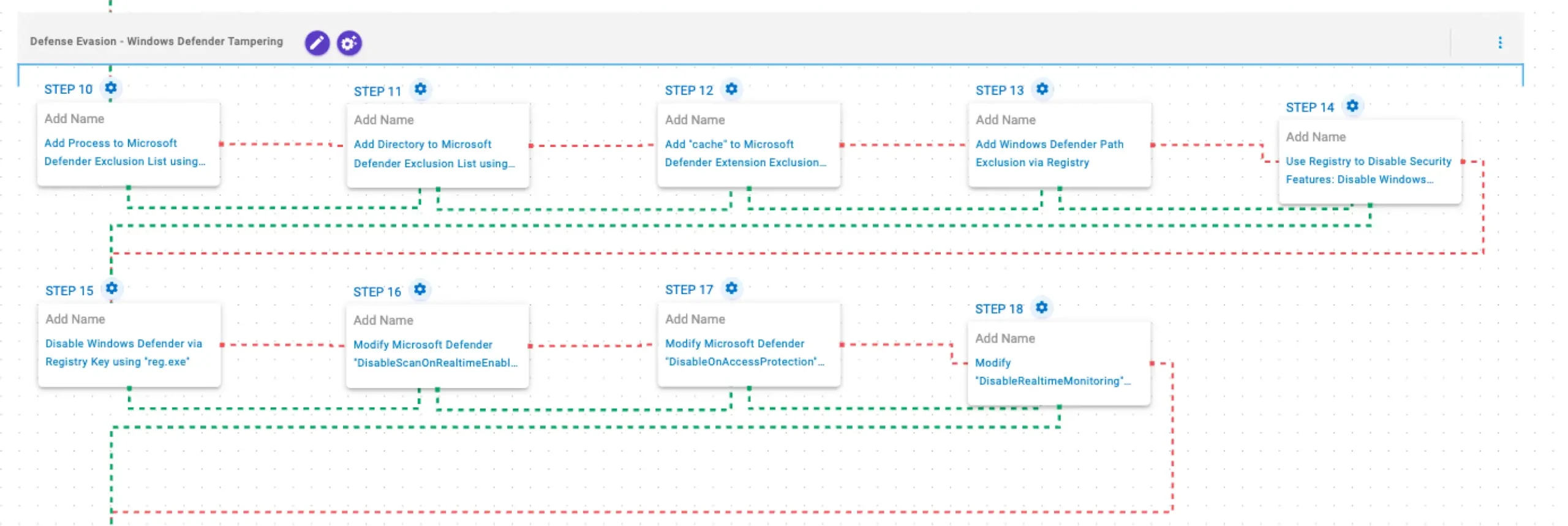
In this stage, Cephalus weakens host defenses by disabling Windows Defender protections via PowerShell and registry modifications, and adds specific directories, processes, and paths to the Defender exclusion lists.
Add Process to Microsoft Defender Exclusion List using PowerShell (T1562.001): This scenario adds a process to the Microsoft Defender exclusion list using the Add-MpPreference Powershell cmdlet.
Add Directory to Microsoft Defender Exclusion List using PowerShell (T1562.001): This scenario uses the Add-MpPreference Powershell cmdlet to add the %TEMP%\aiq-temp-exclusion\ directory path to the Windows Defender exclusion list.
Add “cache” to Microsoft Defender Extension Exclusion List using PowerShell (T1562.001): This scenario uses the Add-MpPreference Powershell cmdlet to add the .cache file extension to the exclusion list of Microsoft Defender.
Add Windows Defender Path Exclusion via Registry (T1562.001): This scenario adds the C:\Windows\System32\svchost.exe path to Windows Defender path exclusions via a registry key modification.
Modify Microsoft Defender “DisableScanOnRealtimeEnable” Registry Key using “reg.exe” (T1562.001): This scenario modifies the registry value DisableScanOnRealtimeEnable under HKLM\SOFTWARE\Policies\Microsoft\Windows Defender\Real-Time Protection to disable process scanning when real-time protection is turned on.
Use Registry to Disable Security Features: Disable Windows Defender’s Real Time Monitoring (T1112): This scenario disables the real-time monitoring functionality of Windows Defender by modifying specific registry values.
Disable Windows Defender via Registry Key using “reg.exe” (T1562.001): This scenario modifies the registry value DisableAntiSpyware under HKLM\SOFTWARE\Policies\Microsoft\Windows Defender to disable Windows Defender.
Modify Microsoft Defender “DisableOnAccessProtection” Registry Key using “reg.exe” (T1562.001): This scenario modifies the value of the DisableOnAccessProtection field under HKLM\SOFTWARE\Policies\Microsoft\Windows Defender\Real-Time Protection registry key to disable on-access antivirus scanning.
Modify “DisableRealtimeMonitoring” Windows Defender Preference (T1562.001): This scenario executes the Set-MpPreference Powershell cmdlet to modify the DisableRealtimeMonitoring Windows Defender preference, effectively deactivating real-time protection.
Impact – Cephalus Ransomware Encryption

This stage begins with the deletion of existing Volume Shadow Copies through vssadmin.exe. Next, it retrieves the adapter information using GetAdaptersInfo API and drives information using DeviceIoControl API. Then, it performs filesystem traversal and file enumeration using FindFirstFileW and FindNextFileW. Finally, Cephalus encrypts files using a combination of AES-256 CTR mode for file encryption and RSA-1024 for key encryption.
Delete created Volume Shadow Copy using “vssadmin.exe” (T1490): This scenario executes the vssadmin.exe utility to delete a recent Volume Shadow Copy created by the assessment template.
System Network Configuration Discovery via “GetAdaptersInfo” Native API (T1016): This scenario executes GetAdaptersInfo Windows native API call to retrieve adapter information from the local computer.
System Drive Information Discovery via “DeviceIoControl” Native API (T1082): This scenario executes the DeviceIoControl Native API function to retrieve system drive information, such as the serial number, to profile the target’s system.
File and Directory Discovery via “FindFirstFileW” and “FindNextFileW” Native API (T1083): This scenario executes the FindFirstFileW and FindNextFileW Windows native API calls to enumerate the file system.
Cephalus File Encryption (T1486): This scenario performs the file encryption routines used by common ransomware families. Files matching an extension list are identified and encrypted in place using similar encryption algorithms as used by Cephalus ransomware.
Opportunities to Expand Emulation Capabilities
In addition to the released assessment template, AttackIQ recommends the following existing scenarios to extend the emulation of the capabilities exhibited in this advisory:
DLL Side-Loading (T1574.002): This scenario leverages a legitimate and trusted executable to load a malicious Dynamic-link Library (DLL).
Wrap-up
In summary, this emulation will evaluate security and incident response processes and support the improvement of your security control posture against the behaviors exhibited by Cephalus ransomware. With data generated from continuous testing and use of this assessment template, you can focus your teams on achieving key security outcomes, adjust your security controls, and work to elevate your total security program effectiveness against a known and dangerous threat.
AttackIQ is the industry’s leading Continuous Threat Exposure Management (CTEM) platform, enabling organizations to measure true exposure, prioritize risk, and disrupt real-world attack paths. By moving beyond static vulnerability data, AttackIQ operationalizes CTEM by continuously validating exposures against real adversary behavior and defensive controls. The platform connects vulnerabilities, configurations, identities, and detections into adversary-validated attack paths—quantifying the likelihood of attacker movement and impact. This evidence-based approach empowers security leaders to focus on what matters most, optimize defensive investments, and strengthen resilience through threat-informed, AI-driven security operations.